How Connected Operations Reduce Medicaid Billing Denials
September 18, 2026

Billing denials cost home care agencies more than revenue. They consume staff hours, delay cash flow, and create compliance exposure that compounds month over month. For Medicaid providers, the root cause often has nothing to do with the billing department. Denials frequently trace back to upstream breakdowns in scheduling, visit verification, and EVV data capture.
This article maps where billing denials originate, how each operational step contributes to claim readiness, and how eCaring connects scheduling, EVV, and billing into one workflow so your agency can submit cleaner claims from the start.
Key Takeaways: EVV and Medicaid Billing
- Most Medicaid billing denials originate upstream in scheduling, EVV, or visit verification rather than in billing itself.
- Schedule accuracy directly determines whether your claims carry the correct service, authorization, and caregiver data.
- Connected EVV captures the six data points required by the 21st Century Cures Act within your existing workflow.
- Rules-based visit verification catches exceptions before claims reach the payor, reducing costly rework and resubmissions.
- eCaring unifies scheduling, EVV, and billing in a single platform so every visit builds a clean, traceable claim.
Why Billing Denials Often Start Before Billing Begins
When a Medicaid claim is denied, the billing team typically investigates the rejection code, corrects the data, and resubmits. That cycle consumes hours. According to a 2026 study published in Health Affairs Scholar, Medicaid managed care had the highest initial denial rate for professional claims at 15.1%, with safety-net providers facing even steeper rates.
The data error that triggered the denial, however, usually happened days or weeks earlier during scheduling or at the point of care.
What Clean Claims Depend On Upstream
A clean Medicaid claim requires verified visit hours, confirmed caregiver identity, accurate service codes, valid authorization, and compliant EVV data. Each of those elements originates before billing begins. If the schedule assigns the wrong service type, the claim carries the wrong code. If EVV data is incomplete, the payor rejects the visit.
Authorization utilization matters too. When visits exceed authorized units or fall outside approved date ranges, payors deny the claim regardless of how accurately the billing file is formatted.
Why Rework Grows in Fragmented Systems
Agencies that rely on separate tools for scheduling, EVV, and billing face a reconciliation problem. Data must be exported from one system, reformatted, and imported into another. Each handoff introduces the risk of mismatched records, missing fields, and timing gaps.
The billing team ends up manually cross-referencing schedules against EVV logs and authorization records. That manual process does not scale. Errors multiply as visit volume grows.
How Scheduling Sets the Foundation for Clean Billing
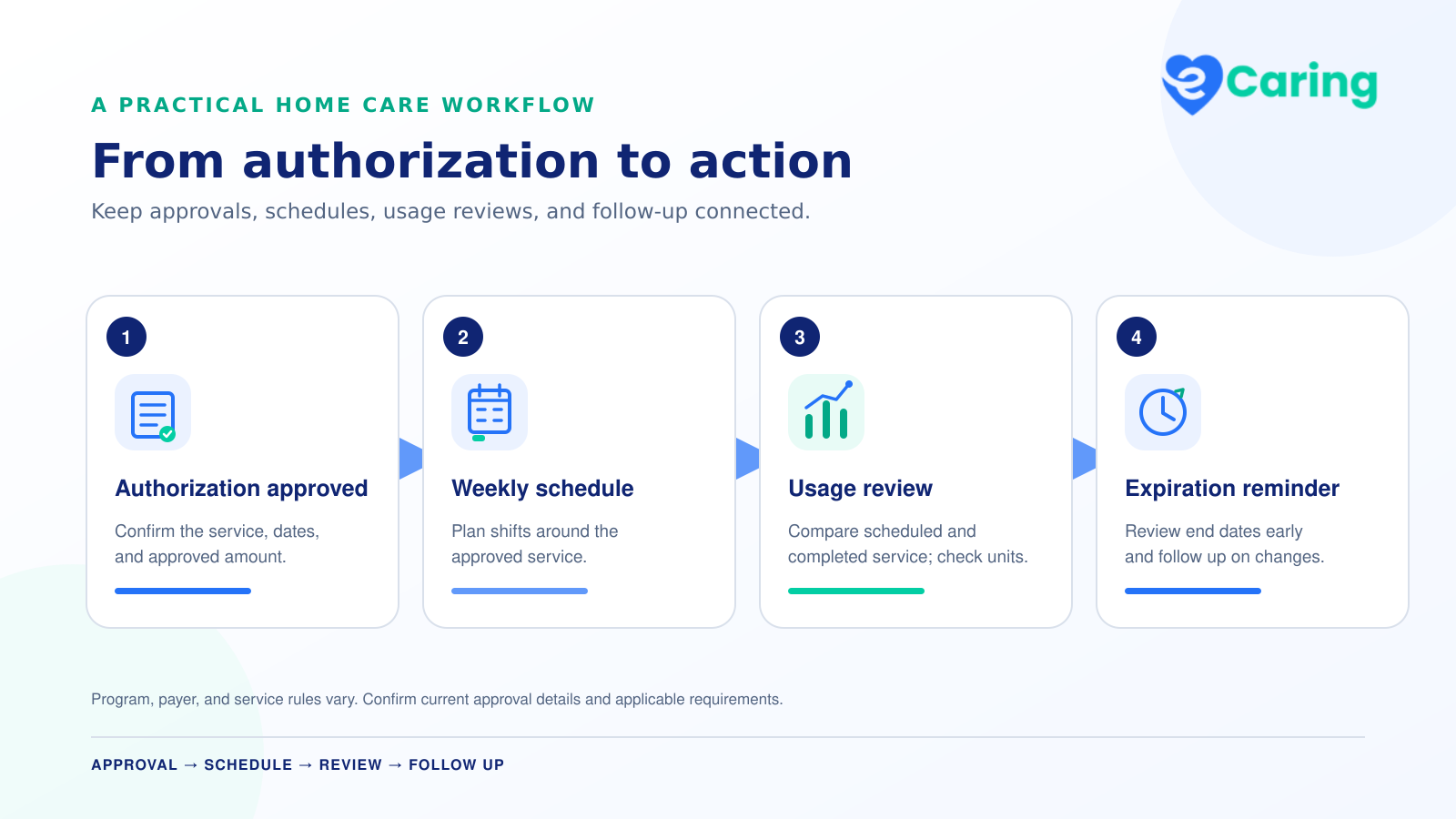
Scheduling is where claim data first takes shape. The service type, caregiver assignment, client authorization, and shift duration all originate in the schedule. If any of those values are incorrect at scheduling time, every downstream system inherits the error.
How Schedule Changes Affect Claim Readiness
Home care schedules shift constantly. Caregivers call out. Clients cancel. Shifts get reassigned. Each change needs to update the caregiver, service code, and authorization link. In disconnected systems, those updates may reach the billing file late or not at all.
eCaring's Smart Scheduling Engine ties every shift to the client's service, payor, and authorization record. When a shift is reassigned, the platform carries forward the correct data. Schedulers see near real-time compatibility scores for every caregiver-client pairing, factoring in availability, location, historical care, and overtime considerations.
How Real-Time Visibility Helps Teams Intervene Earlier
Late arrivals, missed clock-ins, and no-shows all create billing gaps. If the office learns about a missed visit hours later, the window to correct or reschedule may have closed.
eCaring sends automated shift reminders to caregivers via SMS and alerts schedulers to late arrivals in near real-time. Shift Pop gives schedulers shift-level details including scheduled time versus actual duration, shift status, and direct communication tools. That visibility lets teams resolve issues before they become billing problems.
How EVV Strengthens Visit Integrity and Compliance
The 21st Century Cures Act requires Medicaid-funded personal care and home health visits to capture six data points electronically: the type of service, the client receiving care, the caregiver providing care, the date, the location, and the start and end times. Missing or inaccurate EVV data is one of the most common reasons Medicaid claims are denied or delayed.
What EVV Data Needs to Capture
Compliant EVV is more than a GPS check-in. Each visit record must tie the caregiver's identity and location to the specific service authorized for that client on that date. The data must align with the schedule and the authorization to pass payor validation.
The eCaring Mobile App captures all necessary visit details to comply with EVV regulations. Caregiver locations, clock-in/out times, and attendance records are automatically documented, ensuring full compliance with state requirements. The app also supports offline workflows and synchronizes data when connectivity returns.
Why Connected EVV Is Better Than a Disconnected Process
When EVV is a standalone system, agencies must export visit data and reconcile it against their scheduling and billing platforms. That reconciliation adds administrative time and introduces discrepancies that trigger denials.
eCaring keeps EVV connected to the work your agency is already doing. Every step builds on the same client, caregiver, payor, service, authorization, and care-plan information that started in the schedule. Office staff can review visit activity, identify exceptions, and complete verification from within the same application.
How Visit Verification Reduces Exceptions Before Claims Go Out
Visit verification is the checkpoint between care delivery and billing. It confirms that what was scheduled, what was delivered, and what will be billed all align. Without a structured verification step, discrepancies pass through to claims and become denials.
How Rules-Based Verification Works
eCaring's Auto Shift Verification follows a four-step process. First, authorized care is completed and visit details including time, tasks, signatures, and location are recorded. Second, agency-defined rules evaluate time variances, task completion, signatures, and geofence compliance. Third, visits meeting all rules are automatically verified, while exceptions are routed for manual review. Fourth, verified service details are locked and flow into billing and payroll.
With configurable rules tailored to each agency's thresholds, visits can be automatically verified or flagged for review with precision and consistency.
How Exception Review Reduces Manual Cleanup
Not every visit will pass automated verification. A caregiver may clock in outside the geofence, or a shift may run longer than the authorized duration. What matters is whether your team catches those exceptions before billing or after a denial.
eCaring routes flagged visits to the appropriate staff for review. Schedulers can manually verify shifts that fall outside auto-verification rules, with real-time editing and a full audit trail. This pre-billing review prevents exceptions from becoming rejected claims.
How eCaring Connects Scheduling, EVV, and Billing in One Workflow
Unlike traditional platforms where visit verification is fragmented across scheduling, finance, and payroll teams, eCaring brings everything together into a single, intelligent workflow. That connection between modules is what makes clean billing possible at scale.
What Billing Teams Can Trace in One System
Every billed visit in eCaring comes backed by EVV data covering time, location, and caregiver identity. Each visit record also includes care notes, tasks, shift details, authorization and utilization history, and a log of user actions and adjustments. When a payor, auditor, or internal stakeholder asks for proof, everything is already in the system, linked and traceable.
That traceability means billing teams spend less time chasing missing data and more time reviewing claims that are ready to submit.
Why Connected Data Supports Faster Payments
When all visit, authorization, and payor data is in sync, your billing team can generate claims and billing files tailored to payor requirements, create accurate private pay invoices per client and date range, and reduce manual corrections, rejected claims, and write-offs.
eCaring's Payor Management supports Medicaid, MCOs, VA, private pay, and long-term care payors in one place. The platform applies payor-specific rules and rates automatically, ensures visits align with authorizations and utilization, and flags visits that do not meet payor or EVV requirements before billing. The result is shorter billing cycles, healthier cash flow, and less administrative stress.
In Conclusion: Cleaner Medicaid Billing Starts with Better Operations
Billing denials are a downstream symptom of upstream operational gaps. When scheduling, EVV, and visit verification operate in disconnected systems, errors accumulate and billing teams absorb the cost of reconciliation and rework.
Connected operations change that pattern. When every shift is tied to the right client, service, authorization, and payor from the moment it is scheduled, and when EVV and verification happen within the same workflow, your claims carry the data payors need the first time.
eCaring was built for this purpose: to give home care agencies a single source of truth from scheduling through billing, reducing the fragmentation that creates denials in the first place.
FAQs about Medicaid Billing Denials and EVV
What are the most common causes of Medicaid billing denials in home care?
The most frequent causes include missing or inaccurate EVV data, mismatched service codes, authorization overages, and incomplete caregiver documentation. These issues typically originate in scheduling or at the point of care, not in the billing department.
How does EVV compliance reduce Medicaid claim denials?
EVV captures the six data points required by the 21st Century Cures Act, including caregiver identity, location, and visit times. When that data is accurate and connected to your schedule and authorizations, claims pass payor validation with fewer rejections. eCaring captures EVV data within the same workflow your team already uses for scheduling and billing.
What is Auto Shift Verification, and how does it prevent billing errors?
Auto Shift Verification is eCaring's rules-based process that evaluates each visit against agency-defined thresholds for time variance, task completion, signatures, and geofence compliance. Visits that pass are automatically verified and locked for billing. Exceptions are routed for manual review before claims are generated.
Can connected scheduling really improve billing outcomes?
Yes. When your schedule is tied to client authorizations, payor rules, and service codes, every shift starts with the data billing needs. eCaring's Smart Scheduling Engine links each shift to the correct client, service, payor, and authorization record, so downstream systems inherit accurate information from the start.
How does eCaring help agencies manage multiple Medicaid payors?
eCaring's Payor Management module handles Medicaid, MCOs, VA, private pay, and long-term care payors in one platform. The system applies payor-specific rules and rates automatically and flags visits that do not meet requirements before billing, so your team can address issues before claims go out.